Friday, January 05, 2007

How can you know accurate account of the data flowing through your computer's Internet connection?


With the help of Bandwidth Meters You can know Your network activity. You will know the amount of downloaded data,Uploaded data, or total amount of both with the help of Bandwidth meters. Also You will know about the average download speed,average upload speed with the help of bandwidth meters.

Using the Alerts feature, Bandwidth Meters can notify you when you have uploaded/downloaded a certain amount of data, or if your speed goes above or below any limit that you specify.

Suppose your ISP put a total Download/Upload limit to 20 GB per month. Then you can enter these details in Bandwidth meters. Then they will warn you when you approach your limit. Bandwidth Meters work with all types of network connections: phone modems, ADSL, ISDN, DSL, cable modem, LAN, satellite, and more.

Some Bandwidth meters helps you to be protected against network threats.

Now I will introduce you about two Bandwidth Meter Softwares.
Bitmeter 2 is a free Bandwidth Meter software. Bitmeter 2 is given away completely free of charge, there is no trial period, no time-limited features, no spyware, and no adware. Bitmeter 2 requires version 1.1 or later of the Microsoft .NET framework to be installed.

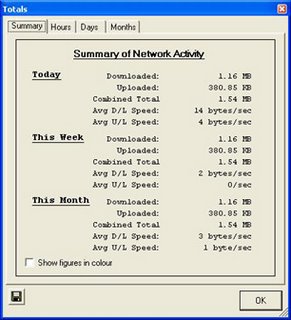
After installing the Software, Rightclick the Bitmeter Icon on the System Tray then choose Statistics Grid option then you will get network activity details like this.

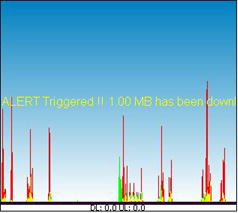
We can set Alerts also. You will get the Alerts option by rightclicking the Bitmeter Icon on the system tray. You can set download,upload alerts as you like. Suppose if you set a download alert for 1 MB. Then it will alert you by displaying a message and by playing a sound when you exceeds your download size of 1 MB like this.

Download Bitmeter 2

Now I will tell about second one DU Meter. DU Meter is an award winning utility from Hagel Technologies. DU Meter helps you to be protected against network threats also. Remaining Features will be almost same as above.

But this is not a freeware. This is a Shareware program. For one month you can use it freely. After one month for the program to work you have to purchase it.

Download DU Meter


Thursday, January 04, 2007

Download Microsoft .NET Framework 1.1 Service Pack 1 (SP1)


The main use of Microsoft .NET Framework 1.1 Service Pack 1 (SP1) is improved security. SP1 provides better support for consuming WSDL documents, Data Execution prevention and protection from security issues such as buffer overruns. SP1 is available in 22 languages. This supports all Windows Operating systems from win98 to windows vista. Microsoft Internet Explorer 5.01 or later must be installed in your system.

Download Microsoft.Net Framework 1.1 SP1


Wednesday, January 03, 2007

Free and Open Source PDF Splitter and Merger utility


By using this pdf splitter, pdf merger software we can split any PDF file irrespective of it's size. Suppose a PDF file has 200 pages. If you want 100 page only from that PDF file then by using this software we can get the 100 page as separate PDF file. In this software we can specify the page numbers we want to split from a PDF file like 5(only page 5),1-17(pages from 1 to 17) etc.

In this software first Add the file to be split . For adding file click file menu then you will find Add Files option. You can easily add the PDF file in your system to the list by Add Files option. Then that PDF file Path and Page Count will appear in PDF file list. Just double click so many times on the first row which contains Page Count and PDF file path. Then a typing box will appear to the left side of the Page Count file. In that box you can specify the page numbers you want to split from the file. Then you can split the PDF file by clicking Split into Single Page Files button on the Top.


Suppose you have splitted first five pages of a PDF file. Then with this pdf merger software you can merge those 5 individual pages to a single PDF file. This is a very useful software.

In the website you will find three download links. First link is a open source file. If you have sound software knowledge you can also add extra features to this software. For downloading the software you have to click the third link Download PDF Splitter And Merger v1.11 MSI Installer.

Microsoft .NET Framework version 1.1 is required for this software to work.
Also install Microsoft .NET Framework 1.1 Service Pack 1.

Download PDF Splitter And Merger v1.11 MSI Installer


Download PDF To TEXT Converter


This program converts PDF document to plain text. It doesn't requires Adobe Acrobat . This is compatible with PDF standard 1.6.

In general For modifying any PDF document we must need Adobe Acrobat. But this software converts PDf file to a text file. Then we can make any changes to a text file very easily. We can also make it as MS WORD file by just copying the text file matter to MS WORD file easily. So there is no need of Adobe Acrobat.

But this software is a trial version only. It converts only first five pages of a PDF file to text. You can use the trial version life long.

Download PDF To TEXT Converter


Tuesday, January 02, 2007

Latest FDISK program for High Capacity Hard Disks


By using Fdisk in Win 98,Win ME bootable disks we can make partitions of Hard Disks of size upto 64 GB. We can also make partitions of disks greater than 64 GB but Fdisk won't show correct size of harddisk partitions. Latest Fdisk can make partitions of high capacity Hard Disks of size greater than 64 GB.

You can get the update file from Microsoft site. Just this is 175 kb file. Run this file in Windows 98 O.S. Then it will save latest Fdisk.exe in Windows\command and Windows\options\cabs folders. Just copy this latest Fdisk.exe from any one of the above folders to Win 98 start up disk.

Download Latest Fdisk.