Microsoft Windows Server 2008 is the next generation of the Windows Server operating system. Windows Server 2008 builds and based on Windows Server 2003 operating system.
In Windows Server 2008 powerful improvements are made to the base operating system over Windows Server 2003. Powerful improvements are made to networking, advanced security features, remote application access, centralized server role management, performance and reliability monitoring tools, failover clustering, deployment, and the file system.
Download Windows Server 2008 Beta
Saturday, June 16, 2007
Windows Server 2008 Public Beta


IZArc 3.81
IZArc is a freeware archive utility. It supports archive formats like 7-ZIP, A, ACE, ARC, ARJ, B64, BH, BIN, BZ2, BZA, C2D, CAB, CDI, CPIO, DEB, ENC, GCA, GZ, GZA, HA, IMG, ISO, JAR, LHA, LIB, LZH, MDF, MBF, MIM, NRG, PAK, PDI, PK3, RAR, RPM, TAR, TAZ, TBZ, TGZ, TZ, UUE, WAR, XXE, YZ1, Z, ZIP, ZOO.
IZArc repairs damaged zip archives. IZArc opens ISO, BIN, CDI and NRG cd image files. Also IZArc converts cd image files from one type to another.
With IZArc you can easily create self-extracting archive that can be extracted easily by double clicking the file. Just right click an archive file. Now select IZArc then choose Create Self-Extracting (.EXE) File.
IZArc converts one archive format to other format. Just right click an archive file. Now select IZArc then choose Convert Archive. Just select the Output format then click O.K.
IZArc supports 256-bit AES encryption to secure your data. IZArc supports multi languages.
IZArc is compatible with Windows 98/NT/2000/XP/2003/Vista (32 bit).
Download IZArc
Friday, June 15, 2007
Vista Codec Package 4.4.6
This is a Free Vista Codec package. This package contains all the Codecs you will need to view all movies and videos. Also you can listen all audio files. So you won't need to install any other Codec package. So uninstall all other Codecs before installing this package.
Recent package changes
Fix MP4 playback
Improve Nero product compatibility
Allow thunbnail views for rmvb, mp4, flv, mov, mkv, more
Remove several redundant files/filters
Fix DVD Playback in WinXP
FFDshow updated 1283 unicode
AC3Filter updated to 1.45b with Language files
Haali components updated to 1.7.189.11
MPEG1 files handled by microsoft decoders
Download Vista Codec Package 4.4.6
Safari 3 Public Beta now on Windows
All of us know that Safari is the browser of Apple Macintosh Computers. Now Apple recently released Safari 3 beta on Windows. Safari 3 supports Windows XP/Vista. This beta version is working fine in Windows Vista with no problems.
Safari is the fastest web browser on any platform. It is faster than Internet Explorer 7 and Firefox 2. It has also the latest features like today's famous browsers. So I won't talk about it's features.
By default you see no status bar in Safari. You can make it visible by selecting Show Status Bar in View menu. Also by default no Home button is present in the toolbar. We can drag home button into the toolbar very easily. Select Customize Toolbar from View menu. Then drag Home button into the Toolbar. Now click done.
The color of Safari's Menu bar, Toolbar, Tab bar, Status bar is almost same as Windows Vista's Taskbar. So Safari's design is best suited for Windows Vista. Once look into the following Figure. You will agree with me.

Thursday, June 14, 2007
Bsnl Broadband configuration (single and multiple computers) for Windows Vista
Bsnl Broadband configuration to single computer:
The department will do all the wiring connectons of ADSL modem,Splitter etc. I will roughly tell about the wiring connections we have to do for getting internet.
My modem is Huawei Smart Ax MT 880. Spiltter is common to all. Now I will roughly tell the wiring connections.
On the back panel of Huawei MT 880 you can observe power suppy point, power on/off button, ethernet port and adsl port.
Splitter has two ports on one side. From one of the ports connect a RJ-11 Telephone cable to adsl port of the Modem. From the second port connect a RJ-11 Telephone cable to our phone instrument.
Splitter has another port on other side. From this port connect a RJ-11 telephone cable to RJ-11 socket.
Connect LAN cable from Ethernet port of Modem to Ethernet port of your computer. Give power supply to modem through the adaptor.
Windows Vista Bsnl Broadband Configuration:
Open Control Panel. Then click Network and Internet. Now click Network and Sharing Center. Now click Manage Network Connections. Now right click Local Area Connection then click properties. Now click continue. Now Local Area Connection properties will be opened as below.
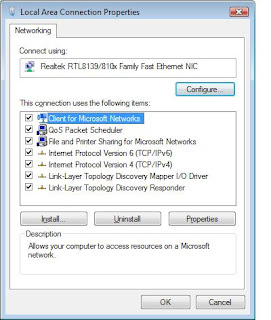
Now double click Internet protocol Version 4. Now configure TCP/IP Properties as explained below.
Select Use the following IP Address and set the IP address to 192.168.1.x(x is any number between 2 to 255). I have entered IP Address as 192.168.1.7 Now enter Subnet Mask 255.255.255.0, Default gateway 192.168.1.1, Preferred DNS server 61.1.96.69, Alternate DNS server 218.248.255.145 as shown in the figure below.
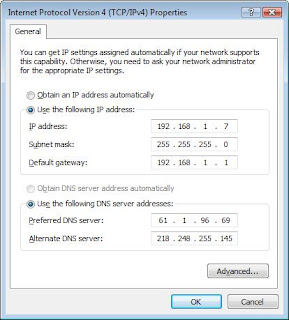
Now click O.K. Again click O.K.
Now you have to configure Huawei Smart Ax MT 880 adsl modem. I already explained about configuration of Huawei adsl modems in one of my articles. In the same article I also explained about sharing the internet connection among more than one Computer. So I won't explain it now. Just follow the link below for adsl modem configuration. Read that article from Huawei MT 880/MT 882 CPE Configuration. You can also get details of sharing the internet connection among more than one Computer in the same article. So follow the Link below for adsl modem configuration and for sharing the internet connection among multiple computers.
Huawei ADSL Modem Configuration
Subscribe to:
Posts (Atom)