THE TECHNOLOGY INFO

Google
PC TROUBLESHOOTING
Windows Registry

Rigistry TIPS

Latest FDISK

Partitions By FDISK

Format harddisk By DM 9.46

Format High Capacity harddisk By DM

Format High Capacity harddisk By Win XP C.D
Add to Technorati Favorites
E-MAIL SUBSCRIPTION
 Subscribe in a reader

Enter your email address:

Delivered by FeedBurner

PC TROUBLESHOOTING
Windows Vista Installation

Windows Vista Bsnl Broadband Configuration

10 Important Things in Windows Vista

Windows XP Installation

Windows XP Commands

Windows XP Printer Installation

Windows XP Network Printer

HP LaserJet 1018 Network Printer Installation

Installation of C,C++

ADSL Modem Configuration

LINUX
Fdisk Partitions for Windows/Linux Dualboot

Linux Partitions Creation and Linux Installation

HTML
Basic Tags

Body Text Tags

Table Tags

Creating Links

Design Your Website

Promote Your Blog

SOFTWARES
Latest Nvidia Drivers

Latest ATI Radeon Drivers

Microsoft .Net Framework 3.0

Java Runtime Environment(JRE)6

AntiVirus Softwares

RSS Readers

PDF Splitter/Merger

PDF To TEXT Converter

Free PDF Converter

Seagate DM 10.45.06

Samsung DM 10.42

QuidProQuo

StudioPRO

Riva FLV Encoder

YouTube Videos

Opera

IVBot

Belarc Advisor

IrfanView 4.00

Free Blogger Templates

Deep Freeze

Latest Hit Games

Enjoy your favorite pictures in 3D environment
Tuesday, January 08, 2008

With My Pictures 3D product line you can place your digital photos into a picturesque environment of realistic 3D galleries. My Pictures 3D package consists of two products, My Pictures 3D Screensaver and My Pictures 3D Album. It is a freeware software.

With My Pictures 3D Album, you can hang your favorite pictures on the walls of a modern Showroom, a secluded Yard or a bohemian-style Art Gallery. It is very easy to hang your favorite pictures.

If you want to add Aish pictures to My Pictures 3D Album, then do as explained below.

Just start My Pictures 3D Album. Then choose Create new gallery then click O.K. Then it display list of galleries. Now select a gallery then click O.K. Now that selected gallery will be opened on the right hand side of the My Pictures 3D Album window. That gallery may be a modern Showroom or an Art gallery or a secluded Yard. Put the Aish pictures folder on desktop. Now select Aish folder on the left hand side of My Pictures 3D Album. Now on the toolbar select Add Image. Then all Aish pictures will be added to the 3D gallery.

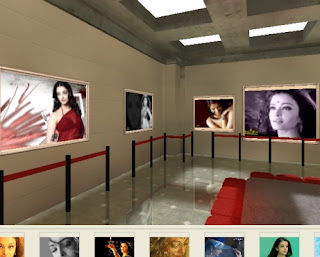
If you want see those 3D pictures, put the mouse pointer on the gallery window and move the mouse pointer while holding left mouse button. While doing like this you will move inside all the rooms of the gallery. You will find Aish Pictures in one of the rooms as shown below.

Download My Pictures 3D


Subscribe to this Feed
DiggIt! | Del.icio.us | Furl It | Netscape | Reddit | Shadows

Spurl This | Stumble It! | Add to BlinkList
posted by K.S.REDDY @ 4:35 PM  
Google
 
Web technodata.blogspot.com
0 Comments:
Post a Comment
<< Home
 
ABOUT ME
Author: K.S.REDDY
E-Mail Me
NETWORKING
Local Area Network

Wide area Network

TCP/IP Protocol

IP Address/Subnet Mask

IPv6

Peer2Peer/Server based N/W

Firewall

The PING Utility

FAT/FAT32/NTFS

DHCP/WINS/DNS

Active Directory

Domain Controllers

Format Harddisk for Windows NT Installation

Windows NT Server 4.0 Installation

Windows NT Sound card Driver Installation

Windows NT Server Printer Installation

Add Windows 98 Client to Windows NT Server

Windows NT DNS Server Installation,Configuration

Windows NT DHCP Server Installation,Configuration

Windows NT WINS Server Installation,Configuration

Windows 2000 Server Installation

Adding Windows 2000 Server Networking Services

Windows 2000 Server Configuration

Windows 2000 Server DHCP Service Configuration

Windows Server 2003 Installation

Windows Server 2003 Configuration

Create NewScope to DHCP in Windows Server 2003

Uninstall Windows Server 2003 Active Directory

ARCHIVES
Links
POWERED BY

Free Blogger Templates

BLOGGER

Copyright © 2006 THE TECHNOLOGY INFO
The articles at this site are copyrighted to K.S.REDDY. These articles may not be copied,posted,modified,reproduced,uploaded,published without Author's written permission.

Subscribe in NewsGator Online Subscribe in Rojo Add to Google Add to netvibes Subscribe in Bloglines