How can you know whether your link partner kept reciprocal link back to you or not? Generally we visit their site, and check their links page for our link. Sometimes it may be very difficult for us to check for our link in our link partner's site if he kept hundreds of links. We can do the link checking easily by QuidProQuo Reciprocal Link Checker Software. QuidProQuo Reciprocal Link Checker Software is a Freeware. It is available as Lite version only. Later we can make it as Full version very easily. Both are doing the same work. QuidProQuo Lite version will spider the websites slowly. QuidProQuo Lite version allows up to 2 threads only. QuidProQuo Full version allows up to 16 threads. It will spider multiple websites at the sametime. So QuidProQuo Full version will spider the websites fastly than Lite version. Only speed is the difference. Other functions are same for both Lite and Full versions.
QuidProQuo Reciprocal Link Checker Software automatically scans your site and locates your link partners.
QuidProQuo Reciprocal Link Checker Software spiders through your link partners sites and verifies reciprocal links back to you.
QuidProQuo Reciprocal Link Checker Software finds link cheaters. Link cheaters are those to whom we are linking but they are not linking back to our sites.
How to use QuidProQuo Reciprocal Link Checker Software?
Start the QuidProQuo Reciprocal Link Checker Software. Now from the Spider menu select Enter your site URL. Type your URL name in the box then click O.K. If you have Full version then increase your Connections to 16 by clicking on up arrow tab.
Now again from Spider menu select Find on your Website from Select Sites to Spider option. Then it will start scanning your site for any website links on your site. It will take time for scanning. After scanning completed it will display all website URL's on your site. These URL's includes your link partners also. So after scanning the software displays each and every website link on your site. The display window will be like below.
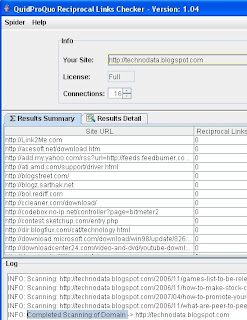
Now from the Spider menu select Spider Partner Sites then QuidProQuo Reciprocal Link Checker Software spiders through all the displayed URL's and verifies reciprocal links back to you. It will take long time for verification since Reciprocal Link Checker Software scans all pages of displayed URL's completely. After verification of a particular URL, it displays all reciprocal links back to you from that particular site.
With QuidProQuo Reciprocal Link Checker Software we can scan a particular page of our website also.Suppose you want to scan a page http://www.example.com/links.html on your website http://www.example.com. Procedure is also same as above. Start QuidProQuo Reciprocal Link Checker Software program. Now from the Spider menu select Enter your site URL. Type your URL http://www.example.com in the box then click O.K. If you have Full version then increase your Connections to 16 by clicking on up arrow tab. Now again from Spider menu select Find on a page from Select Sites to Spider option. Now enter http://www.example.com/links.html in the box displayed then click O.K. Then it displays each and every website link on that page. Now from the Spider menu select Spider Partner Sites then QuidProQuo Reciprocal Link Checker Software spiders through all the displayed URL's in that particular page http://www.example.com/links.html and verifies reciprocal links back to you.
With QuidProQuo Reciprocal Link checker Software we can also check whether a particular site has link backed to you or not. Procedure is like below.
Start the QuidProQuo Reciprocal Link Checker Software. Now from the Spider menu select Enter your site URL. Type your URL name in the box then click O.K. If you have Full version then increase your Connections to 16 by clicking on up arrow tab.
Now again from Spider menu select Edit Sites to Spider from Select Sites to Spider option. Now type the website address which you want to check then click O.K. Now from the Spider menu select Spider Partner Sites then QuidProQuo Reciprocal Link Checker Software spiders through that particular site and verifies reciprocal links back to you.
How to Upgrade Lite version to Full version?
It is very easy for website owners. Just place a reciprocal link to http://www.webmastersloom.com on any page of your site.. Now start QuidProQuo Reciprocal Link Checker Software. Now from Help menu select Upgrade to a Free Full License then click Get Upgrade button. Now type your site address then click O.K. Then QuidProQuo Reciprocal Link Checker Software scans your site for reciprocal link back to their site. You already put a reciprocal link to their site. So QuidProQuo Reciprocal Link Checker Software verifies the reciprocal link. After scanning completed Just close the program and again start the program. From now it upgrades to full version.
Download QuidProQuo Reciprocal Link Checker Software


1 comment:
I visited many sites except the audio feature for audio songs present at this
web page is really excellent.
Feel free to visit my blog post :: small glass tiles
Post a Comment