Thursday, March 01, 2007

What is Phishing?


We can define Phishing as Web Forgery or a Spyware which steals your personal Identity data like your user accounts,passwords etc and financial account credentials like your credit card,bank accounts information etc. Phishing is generally carried out using e-mails,instant messages,phone calls.

Recently I got a email message from E-Bay with subject Power Seller like this:

Dear E-Bay Member,

Congratulations. Your recent selling activity entitles you to Silver Status in the E-bay Power Seller program. Your Membership comes with some great benefits and services.

Download free business templates for Power Seller business cards and letter letterhead.

Sign up today. It's free. Visit www.ebay.com/powerseller(link) and click your Member Sign In.

Again congratulations and best wishes for your continued success

Sincerely
E-Bay Power Seller Team

The above is an example of Phishing email. E-Bay give Power Seller status to only the best trusted sellers only. It won't give Silver Status to every member. Also this mail has not addressed me personally. It has addressed all E-Bay Members. Also I kept the cursor on the link given by them and check it on the status bar. Both Website addresses are not same. One more important thing is I never sell anything in E-bay site.

So this is forged site of E-Bay. If you click their link then it will take you to the forged site of E-Bay. The forged site is same as the original E-Bay site. If you sign into your E-Bay account from their site then they will steal your username and password.

So becareful about this type of Emails linking to forged sites. Also remember that no site will ask about your account details or account verification.

Some more E-Bay Phishing messages have the following subject lines:

UpdateYour Account
eBay Verify Accounts
eBay: Account Violate User Agreement
Account Verification
Update or verify your account informations
Account Suspension Notice - Section 9
New and improved account protection
Security Check
Billing Issues
Update Your Billing Informations
Your account at ebay has been suspended
eBay Security Center Urgent eBay Account Update
Ebay(R) Re-Activation Unit
eBay account verification needed
Your eBay Account Must Be Confirmed
Fraud investigation

Some MSN Phishing messages have the following subject lines:

Microsoft Network customer data verification
Warning Message
Your membership will be cancelled
Account Verification
current network critical patch
MSN HOTMAIL Account Verification

Some Yahoo Phishing messages have the following subject lines:

Important Information Regarding Your Account
E-mail account security warning

Recently Phishers are targetting Banks. If you click those links then they will take you to forged banking sites. The forged sites are same as like original bank sites. If you enter your username,password details then they steal your username and password. They will draw all of your money from your bank account. The banking Phishing messages also have subject lines like E-Bay subject lines. So becareful when you entering your online bank details.

Now all of the Banks are displaying Alert messages in their sites like below.

Uti Bank alert message

In case you have received any e-mail from an address appearing to be sent by UTIBANK, advising you of any changes made in your personal information,account details or information on your user id and password of your netbanking facility, PLEASE DO NOT RESPOND. It is UTIBANK's policy not to seek/send such information through email. If you have already disclosed your password please change it immediately.

Phone Phishing

In Phone Phising users will get a phone call from a bank(Fake). They told users to dial a phone number regarding a problem with their bank account. Once the users dialed the number,then Phishers told users to enter their account numbers and PIN. If you enter those details your money will be stealed by the Phishers.

In every month Phishers are sending 6 billion Phishing emails worldwide. Becareful regarding email messages from E-Bay,Banks,Paypal,Credit Card companies.

Take the following precautionary steps while you browsing.

1. Latest Browsers like Internet Explorer 7.0, Firefox 2.0, Opera 9.10 have Phishing Filters. Use any of the above browsers. They will alert you when you click a link of a forged site. All of the above browsers Phishing Filters are working very well.

2. Don't respond to emails asking about your account details,account verification,credit card details, credit card verification etc.

3. Don't download any attachments or files(html files also) from the suspected Phishing Messages. These files can contain Viruses or Trojan keylogger spyware. They steal your personal data and financial account credentials like your credit card,bank accounts information etc.

4. Take a free Phishing test at the following site. The site will display 10 messages from world famous companies regarding Phishing one by one. You have to observe those messages and tick your opinion whether it is a Phishing message or legitimate message. After completing 10 questions they will explain why a particular message is Phishing or why a particular message is legitimate. You will better understood Phishing after completing the Phishing test.

Free Phishing test

Also you will get plenty of information on phishing by visiting PhishTank site.


Sunday, February 25, 2007

45 Nanometer Transistor Technology


Recently Intel announced that it will use 45nm Transisitors in Intel's next generation processors, codenamed Penryn. Those processors will be available in the second half of 2007. At preset it is using 65nm Transistors in Intel Processors.

First let us know what is a nanometer?

There are one billion nanometers in one meter. The first Transistor was built by Bell Labs in 1947. We can hold it with our hand. We can not see the 45nm Transistor with our eye. We need a very advanced microscope to see it. More than 30 million 45nm Transistors could fit on the head of a pin. More than 2000 45nm Transistors could fit across the width of a human hair. More than 2 million 45nm Transistors could fit on the period(.). A 45nm Transistor can switch on and off at 300 billion times per second.

When compared to today's 65nm technology, we get 20 % improvement in Transistor switching speed and the power consumption is reduced by 30 percent in transistor switching. Due to smaller size of transistors we will get benefit of twice the transistor density. The transistor gate oxide leakage is reduced by 10 times.

Now let us know the new technology in 45nm Transistors

A Transistor is a switch that process the ones and zeroes. A gate is used to turn the transistor on and off. A dielectric is used under the gate to separate the gate from the channel where the current flows. The dielectric is nothing but a insulator. Today's 65nm Technology has been using silicon dioxide as gate dielectric, polysilicon in gate electrode. The transistor size reduces as the thickness of the dielectric reduces. The transistor speed increases by reducing gate electrode length and by reducing the thickness of the dielectric. But as the gate dielectric gets thinner, electric leakage increases. Today's gate dielectric thickness is 1.2nm(equal to 5 atomic layers). Now at this stage it becomes impossible to reduce thickness of dielectric further. If we reduce the thickness further then electric leakage increases further and the transistors become over heated and in sometimes they may burn.

So inorder to reduce electric leakage we have to use some other material as dielectric instead of silicon dioxide. So Intel is using a hafnium-based high-k material in the gate dielectric in their new 45nm Transistors. But this high-k dielectric is not compatible with polysilicon gate electrode. Intel replaced this polysilicon by special metals. These special metal gates are well compatible with hafnium gate dielectric. This combination improves performance of transistors to high level with very low current leakage.

Intel continues to maintain Moore's Law with this new 45nm technology. According to Moore's Law (Intel co-founder), the number of transistors on a chip doubles about every two years.

The number of transistors on first Microprocessor(4004) to latest Processors increases like below.

2000 transistors in first Processor, 4004
29000 transistors in 8080
134000 transistors in 80286
275000 transistors in 386
3000000 transistors in Pentium
9500000 transistors in Pentium 3
55000000 transistors in Pentium 4
77000000 transistors in Centrino
230000000 transistors in Pentium D
1720000000 transistors in Itanium 2
290000000 transistors in Intel Core 2 duo
580000000 transistors in Intel Core 2 quad


Wednesday, February 21, 2007

Yahoo Messenger Plug-ins

An Yahoo Messenger plug-in is an html page embedded inside Yahoo Messenger. The html file contains a combination of html tags and Java script API code. The yahoo plugins run inside Yahoo Messenger. Plug-ins are launched from the main messenger window. But some plugins are launched from the conversation window like IndiChat plugin.

What is the use of these Plug-ins?

Each Plug-in has it's own functionality. With the help of plug-ins we can share large files with our contact list, we can view latest movie trailers right from within messenger, we can view the local time of our contacts, we can get live score of cricket matches worldwide, we can chat with our contacts in our regional languages. For example Indian people can chat with their contacts in their own regional languages with the help of IndiChat plug-in. We can do so many things with the available Yahoo Messenger Plug-ins. At present 169 Yahoo Messenger Plug-ins are available. You can also publish your own plug-in to the Yahoo Messenger Plug-in Gallery.

I will explain about a few Plug-ins.

IndiChat
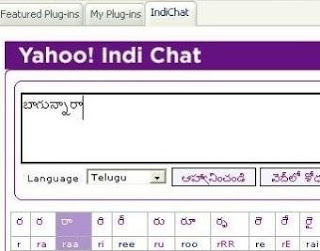
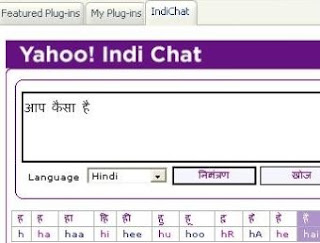
With this plug-in we can converse with our contacts in Indian languages Hindi, Marathi, Tamil, Telugu, Malayalam, Kannada, Bengali, Punjabi and Gujarati. Go to http://gallery.yahoo.com/messenger. Click Get Conversation Plug-ins link. Now click Indichat. then click IndiChat Install Now button. Then first it will load yahoo messenger. So login in to your messenger account with your ID. After you login into your account IndiChat warning window will come. Click yes. Then after some time it will give a message Indichat has been installed. In order to use this plug in, login in to your messenger account then open one of yours contact chat window. In that window you will find Plug-ins tab. Just click that tab. Then click My Plug-ins. You will find IndiChat there. Just click start button. Then you will get IndiChat window like below. You can choose the language you like. Now just type your language words in engish. The plug-in will automatically convert those words to your language. Very simple to use. Remember your contact must also install this IndiChat plug-in.


For getting the above telugu word just type “baagunnaaraa”


For getting the above hindi words just type “aap kaisaa hai”

IM Cricket Cast
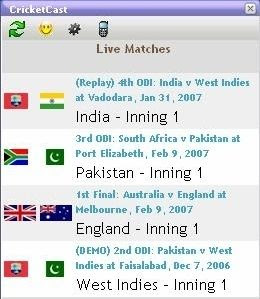
With this plug-in we will get Live scores of worldwide cricket matches. Go to http://gallery.yahoo.com/messenger. Then click sports section. There you will find this Plug-in. Just click on it. Now click Install Now button. Then first it will load yahoo messenger. So login in to your messenger account with your ID. After you login into your account IM Cricket Cast warning window will come. Click yes. Then after some time it will give a message IM Cricket Cast has been installed. In order to use this plug in, login in to your messenger account. In the main messenger window you will find Add Plug-ins tab. Just click that tab. Now click My Plug-ins tab. There you will find Cricket Cast. Just click Start button. Then come to Messenger main window. Now you will find Cricket scores under Add Plug-ins tab.


Local Time
This plug-in displays the local time of your contacts. You will find this plug-in in Tools and Utilities section. You can install and use this plug-in same as IM Cricket Cast.

Yahoo! Movie Trailer
You can watch the latest movie trailers right from within Messenger. You will find this plug-in in Music and Entertainment section. You can install and use this plug-in same as IM Cricket Cast.
EBay
You can browse the ebay market place right from within Messenger. You will find this plug-in in Shopping section. You can install and use this plug-in same as IM Cricket Cast.

Pando
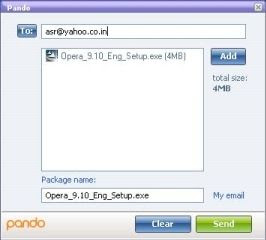
We can share large files or folders with our contacts by this plug-in. You will find this plug-in in Tools and Utilities section. You can install and use this plug-in same as IM Cricket Cast.


I have explained only a few Plug-ins. At present 169 Plug-ins are available. Visit Yahoo gallery page and install the yahoo plugins you like.

http://gallery.yahoo.com/messenger

Monday, February 19, 2007

Opera, The faster, safer and beautiful Browser


Opera browser is easier to use, faster and safer. It takes up less memory. Opera has an integrated email program also. It is also a valuable browsing software like Internet Explorer,Firefox. It is free. It is the most beautiful browser.

Opera Features:

Tabbed browsing
We can open multiple web pages within the same application window. There is no need to open multiple application windows for multiple web pages. So with Tabbed browsing we can surf the web faster and easier.

There is a Trash Can at upper right corner of the Opera browser. You can retrieve accidentally closed tabs from the Trash Can. Blocked pop ups can also be retrieved from the Trash Can.

Security
In every month Phishers are sending 6 billion Phishing emails worldwide. Phishers steal your personal Identity data like user accounts,passwords etc and financial account credentials like credit card,bank accounts information etc.

Opera's advanced fraud protection protects you against web sites that try to steal your personal information. Opera supports security protocols. Opera supports Secure Socket Layer (SSL) versions 2 and 3, and TLS. Opera offers automatic 256-bit encryption, the highest available security of any Web browser.

You can enable fraud protection like below.
Open Preferences from Tools Menu. Then click Advanced tab. Then click security. Now you will observe enable fraud protection. Just put a tick mark at enable fraud protection then click o.k.

Opera displays security information inside the address bar. You can observe yellow security bar inside the address bar like below when you open sites like google adsense.


If you click the yellow security bar then it displays security information like below.


Opera gives Cookie control to users. You can accept or reject Cookies as you like. We can configure Opera to clear the history and cache when exiting.

We can block all pop-ups of websites. If you want you can block pop-ups on certain sites only. For example if you want to block pop-ups of rediffmail only. Now Open rediffmail site. Then right click on a blank space inside the rediff site and select Edit site preferences. Now from the drop down menu select Block all Pop ups then click o.k.

You can also block content like Ads or images on any web page. Just open that web page. Then right click on a blank space inside that web page and choose Block Content. Now hold shift then click on Images or Ads you want to block. Then click done. Then that content will be blocked.

Integrated Search
We can search the web from the toolbar of Opera. By default Google search,Opera search and some other searches present in the drop down menu.


You can add your favourite search engines also to the list. If you want to add Yahoo search first open http://search.yahoo.com then right click on the Yahoo's search field then select Create Search. Then you will observe like below.


Now you can set a keyword also for yahoo search engine. For example set Y then click o.k. Now yahoo search engine is also present in the drop down list. Now you can open Yahoo search engine either from the drop down list or by just typing Y in search bar and press enter. In the same manner you can add your favourite search engines to the list.

BitTorrent
You can download large files by simply clicking a Torrent link. There is no need of a separate BitTorrent application.

Widgets
You can download beautiful widgets from http://widgets.opera.com. Widgets are small fun web programs that you can run right from your desktop. With the help of widgets you can access news,weather,play games and so many things. 985 widgets are available currently.

Skins
At present 85 skins are available. With the help of skins, You can give your browser a stylish look you want.

Download skins at
http://my.opera.com/community/customize/skins/

Voice
You can talk to browser with voice commands. Any ordinary browser command can be done by voice. For example with Opera reload command, the browser automatically reloads. With Opera speak command, the browser will read any selected text on it. Opera with voice works only in windows 2000 or windows xp computers. It supports only English language. Opera Voice to work, you need to have a microphone attached to your computer.

How to enable Voice in Opera?
Open Tools menu then select Preferences then select Advanced then select Voice, and check the Enable voice-controlled browsing option. After enabling the option, you will be asked to confirm that you want to download and install the voice libraries for Opera. Select confirm. Opera will do the rest automatically. Now voice is available.

Now open View menu then select Toolbars then select Main Bar. Now Voice tab is available on the tool bar. Now attach microphone to your computer. To initiate a voice command, click the Voice button or press the Scroll Lock key and say the command, for example, Opera reload. After issuing the command, let go of the button. Now the browser automatically reloads the current web page. So many voice commands are available for Opera.

Download Opera


Friday, February 16, 2007

Linux Partitions creation and Installation of RedHat Enterprise Linux WS(2.4.21-4.EL)


First make partitions as explained in the article How can you make partitions with FDISK For Windows/Linux Dualboot? Get ready with 4 C.D's of RedHat Enterprise Linux WS.

Boot the system with Linux first C.D. System will boot from the C.D and you will get RedHat Screen. Just press enter to install RedHat Enterprise Linux. Then it will detect all the hardware in the system. Sometimes it wont detect some hardware like mouse. Then it will display Mouse Not Detected. (In this case just give the details of your mouse type then you can proceed in the graphical installation Mode otherwise you can use text mode installation which does not require a mouse.)

If you get Mouse Not Detected message then with the help of Tab select O.K then press spacebar. It will display all models of mouses. Select your Mouse model with the help of arrow keys. Then with the help of Tab select O.K then press spacebar. Then it will display Device list with ports. Select your device with arrow keys then with the help of Tab select O.K then press spacebar. Then it will detect your mouse and it displays graphical installation mode window. Just click next. Select your language then click next. Select U.S English Keyboard then click next. Now select your Mouse Model, Device then click next. Now it will display Disk partition setup window. Just select Manually partition with Disk Druid then click next. Then it will display existing partitiuons and free space available on the Hard Disk. Now just click the Free under Drive/dev/hda then at bottom it will show free space and Starting,Ending cylinders. (Suppose for example it shows free space of 13201 MB with start cylinder 3189 and end cylinder 4871.) Just double click the free space at the bottom. Then it will display Add Partition window. In Add Partition window select Mount point as root '/'. Select File System type as EXT3. Then select start cylinder(suppose 3189) and end cylinder(suppose 4771, at least leave last 100 cylinders for Linux Swap partition). Now click O.K. It will give a warning message. Just click continue.

Now double click the Free Space at the bottom to create Linux Swap Partition. Then Add Partition window will come. Now select File System type as swap. Select Start cylinder(suppose 4772) and End cylinder(suppose 4869, it must be less than last cylinder 4871) then click O.K. Now click next. Now Boot Loader Configuration window comes. Select your default O.S as DOS then click next. Next select your Host name either Automatically Via DHCP or Manually as you wish. If you select manually then type a host name then click next. Now select Enable Firewall. Also select services like http,ftp as you wish then click next. Select the default language as English Usa then click next. Select your timezone then click next. Type your root password as you wish then click next. After some time it will display Package defaults. Just click next. Again click next to start installation. Then it will install all packages. After some installation it will ask disk 2. Install disk 2 then click o.k. Then after some installtion it will ask disk 3. Insert disk 3 then click o.k. After some installation it will ask disk 4. Insert disk 4 then click o.k. After some installation it will ask disk 1. Insert disk 1 then click o.k. Then after some time Graphical Interface(X) Configuration will come. Select your Vedio hardware type then select video RAM size then click next. Then select your monitor type and Sync's then click next. Now select your Screen Resolution then click next. Now Installation is complete. Remove the C.D from drive then click EXIT.

Now system will reboot and Grub Version 0.93 loader will come on the screen. Now select RedHat Enterprise Linux WS with arrow keys then press enter. After some time welcome screen comes. Just click next. Click Yes to agree the license agreement then click next. Now Date and Time settings will come. If you want you can Enable network Time Protocol. Also you can select a server for time protocol. Then click next. Next It will ask User Account Details. Type your user name,then enter your password then click next. Then it will detect your sound card and display it's details. Click next. Then it will display RedHat Registration choices. Select your choice then click next. It will display Additional CD's details. Just click next. Then it will ask your user name and password details. Enter those details. Now you completed your Linux Installation.