Friday, October 12, 2007

Watch your screen on any computer over the network or the internet


You can watch your computer screen on any computer over the network or the internet easily with ScreenStream utility program. There is no need to install any special software to view your screen on other computers in the network. Just simply install ScreenStream in your computer and run it from your computer. Now from any computer on your network( or even the internet), you can easily view what is on your screen by typing the link (or optional access code set by you) in the internet browser.

How to use ScreenStream?
First install the software in your computer. Click Finish at the end of installation. Then Network Probe Setup Wizard starts automatically. Now select Router is manually configured. Then click O.K. If Windows Security Center alerts about this program, then simply unblock this program. Now Windows Security Center will allow this program.
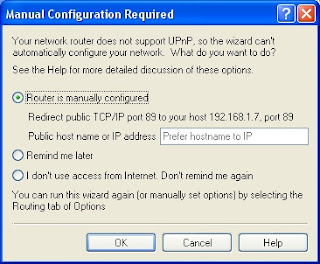


If your computer IP address is 192.168.1.7 then your link address will be http://192.168.1.7:89 So by typing this url address in the internet browser of any computer on your network, you can view what is on your computer screen.

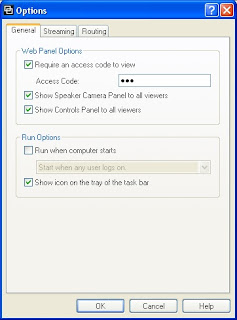
You can also set an access code to view your computer from other computers on the network. Others can only view your screen by typing the access code set by you. If they enter the wrong access code, they cannot view your screen.

How to set access code?
Run ScreenStream program on your computer. Select Options from ScreenStream menu. Now tick Require an access code to view. Type the access code then click O.K.

ScreenStream supports Windows XP/2003/Vista

Download ScreenStream


Thursday, October 11, 2007

How to know current Date/Time in different time zones of the world?

World Time System Tray is a simple desktop widget application which shows the current date/time in different time zones of the world. Also this application has excellent Time Travel feature. With this feature you can know time in different time zones of the world for a particular time zone.

Just right click on World Time System Tray icon which sits on the Taskbar. Now select Time Travel.


Now select a time zone and set a time then click Calculate. Then it displays times of other time zones like Europe, Asia, Africa etc.

It supports Windows NT/2000/XP

Download World Time System Tray

Wednesday, October 10, 2007

Microsoft Windows Malicious Software Removal Tool


Microsoft Windows Malicious Software Removal Tool checks Windows computers for Malicious Software and helps in removing infections like Blaster, Sasser, Mydoom etc. When the tool completes detection and removal process then it displays a report describing about the detected malicious software.

On second Tuesday of each month, Microsoft will release an updated version of this tool. This tool will run on Windows Vista, Windows XP, Windows 2000, and Windows Server 2003 computers. Remember that this is not a replacement for any anti-virus software.

Download Microsoft Windows Malicious Software Removal Tool


Tuesday, October 09, 2007

XULPlayer - An open source media player


XULPlayer is an open source media player which supports all popular audio and video formats. You can play a DVD, VCD or CD with XULPlayer. XULPlayer is built on Mozilla XUL and MPlayer. XULPlayer supports the following audio and video formats.

Audio Formats: MP3, Vorbis, AAC, AAC+, AAC+v2, WMA, RealAudio, MusePack, Speex, FLAC, WavPack, and WAV.

Video Formats: MPEG 1/2/4, AVI, MP4, MKV, H.264, XviD, DivX, Theora, Flash Video, WMV (Windows Media Video), ASF, RMVB (RealVideo), MOV (QuickTime).

XULPlayer also supports JPEG, PNG, GIF image formats.

You can play two audio/video files simultaneous with XULPlayer. No need to install any codecs or splitters for playing audio/video files.

Download XULPlayer


Saturday, October 06, 2007

How to know all information about your video card?


With a small utility program GPU-Z, you can know all information about your video card and GPU.

GPU-Z utility supports both Nvidia and ATI cards. It displays adapter, GPU and display information. This utility displays overclock, default clocks and 3D clocks (if available). It supports Windows 2000/ XP/ Vista. No installation is required. Just double click the utility, then it displays all information about your video card as shown below.


Download GPU-Z