Wednesday, August 01, 2007

How to run Classic Dos Games in Windows with Dos Box 0.71?


Many Old Dos Games cannot be run on new computers and new operating systems like Windows 2000, Windows XP, Linux, Mac OS X, OS/2, BeOS and FreeBSD. You can run all old dos games and dos applications in windows, Linux, Mac OS X, OS/2, BeOS and FreeBSD with Dos Box. You can run all classic dos games like Prince of Persia, Jazz Jackrabbit, Quake etc., on Windows, Linux, and FreeBSD. You can play all games with excellent sound quality. At present DosBox 0.71 version is available.

Now I will explain how to run a dos game with DosBox 0.71

For example I will explain how to run Prince of Persia game in Windows with DosBox 0.71 program. First install DosBox 0.71 in C drive. Now create a folder dosgames in C drive. Now copy the prince game to this folder. There must be a exe file for every game. For Prince Of Persia the game exe file is 4d_prin. This exe file is in prince folder. Remember this exe file. If you want to run some other games, you must keep all those dos games in dosgames folder of C drive.

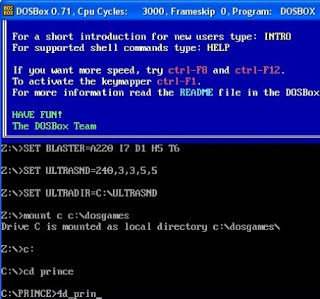
Now run DosBox 0.71 program. Now you will get the DosBox window with z:\> Prompt. Now type the following command at the z Prompt.

mount c c:\dosgames then press enter. Now drive c is mounted as local directory c:\dosgames\ and it again comes to z prompt.

At the z prompt type as shown below.

z:\>c: then press enter. Now it comes to c prompt as shown below.

c:\>

Now type the following command at the c prompt.

c:\>cd prince then press enter. Then it will come to prince directory as shown below.

c:\prince> now type the following command as shown below.

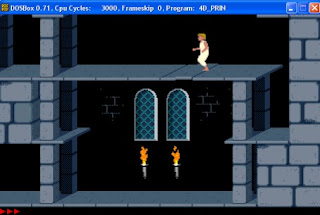
c:\prince>4d_prin then press enter. Then prince game will run on your system. If it is not in Full Screen mode then just press Alt plus Enter buttons. Then the game will run in full screen mode.

See the screenshot of above commands.


Also see the screenshot of Prince of Persia

Download DosBox 0.71

Download Classic Dos Games


Tuesday, July 31, 2007

FireFox 2.0.0.6 released for Windows, Mac and Linux


The following Security Issues have been fixed in FireFox 2.0.0.6.

Previous FireFox versions did not percent-encode spaces and double-quotes in URIs handed off to external programs for handling, which can cause the receiving program to mistakenly interpret a single URI as multiple arguments. This bug is fixed in FireFox 2.0.0.6.

Privilege escalation through chrome-loaded about:blank windows issue also has been fixed in FireFox 2.0.0.6.

Due to Security Fixes, Mozilla recommends all of it's users to upgrade to latest FireFox 2.0.0.6

Download FireFox 2.0.0.6


Monday, July 30, 2007

XAMPP 1.6.3 for Windows and Linux


XAMPP is an easy to install Apache distribution containing MySQL, PHP and Perl. XAMPP is very easy to use.

XAMPP includes:

Apache 2.2.4
MySQL 5.0.45
PHP 5.2.3 plus PHP 4.4.7 plus PEAR
PHP-Switch win32 1.0
XAMPP Control Version 2.5
XAMPP Security 1.0
SQLite 2.8.15
OpenSSL 0.9.8e
phpMyAdmin 2.10.3
ADOdb 4.95
Mercury Mail Transport System v4.01b
FileZilla FTP Server 0.9.23
Webalizer 2.01-10
Zend Optimizer 3.3.0
eAccelerator 0.9.5.1 for PHP 5.2.3

At present there are four XAMPP versions are available. They are:

version for Linux systems (Ubuntu, SuSE, RedHat, Mandrake and Debian)
version for Windows 98, NT, 2000, 2003, XP and Vista
beta version for Solaris SPARC (developed and tested under Solaris 8)
and a beta version for Mac OS X.

Use the beta versions at your own risk.

Important Note: In Vista, do not install XAMPP in c:\program files folder. Install XAMPP in folders like c:\xampp or c:\myfolder\xampp.

Download XAMPP


Sunday, July 29, 2007

Download DirectX(June 2007) Redist full package and DirectX End-User Runtime Web Installer


Microsoft DirectX is a group of technologies designed to make an ideal platform for Windows based computers for running and displaying rich multimedia applications.

June 2007 Redistributable Package is DirectX 9.19.1007 version. This DirectX redist package includes all the latest and previous released DirectX runtime. This includes the bi-monthly D3DX, XInput, and Managed DirectX components with file size of 53.6 MB. This DirectX runtime cannot be uninstalled.

Download DirectX June 2007 Redist Full Package

Recent DirectX End-User Runtime Web Installer needs internet connectivity during installation. This package provides updates to DirectX 9.0c and previous versions of DirectX. This package is available to customers running genuine Microsoft Windows. This DirectX runtime cannot be uninstalled.

Download DirectX End-User Runtime Web Installer


Saturday, July 28, 2007

Debugging Tools for Windows


Debugging Tools are used for debugging windows operating systems. They also debug drivers, applications, and services run on the windows operating systems. Both 32 bit and 64 bit Debugging Tools are available. You can use 64 bit Debugging Tools package, if you have a 64 bit Processor system. These are Free Tools from Microsoft.

32 bit Debugging Tools supports 32 bit or 64 bit Microsoft Windows Server 2003, 32 bit or 64 bit Windows XP, Windows 2000, Windows NT 4.0, Windows Vista, or Windows Server with codename Longhorn.

64 bit Debugging Tools supports 64 bit Microsoft Windows Server 2003, 64 bit Windows XP, 64 bit Windows Vista, or 64 bit Windows Server with codename Longhorn.

Download 32 bit Debugging Tools for Windows

Download 64 bit Debugging Tools for Windows