Wednesday, July 18, 2007

Rainlendar


Rainlendar is a Desktop Calendar application with a wide variety of Skins. Rainlendar is platform independent, so Rainlendar can be run on Windows 2000/2003/Vista/XP and linux also. We can store our Events and Tasks. We can also set an alarm for those Events and Tasks. Rainlendar will alert you in advance by alarm before the Event or Task takesplace. We can set alarm in minutes, hours, days before the event starts.

We can change the appearance of the calendar with the the help of Skins. For getting skins rightclick on the calendar. Then select Options. Then click Skins. Now click Get More Skins. That link will take you to the Skins page of Rainlendar site. Now you can download the Skin you like.

Old skins and New skins are available for Rainlendar. Old skins are generally in Zip or Rar format. To install old skins, just uncompress the skin into the skins folder of Rainlendar. To install new skins just double click them.

Observe the skin below.


Download Rainlendar


Tuesday, July 17, 2007

JaBack - Free Automated Data Backup Software


Jaback backups your files and folders. Jaback creates the backup file or folder in standard zip format. Any zip software can unzip the backup file easily. You can also unzip the backup file using Jaback's Zip Viewer utility. Also You can Transfer your backup data to a remote location via Ftp or Email it to your mail server.

How Jaback backup the files?
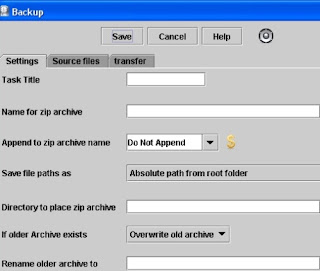
First create a folder in your computer to place the backup file. So for example create a folder named backup in your D drive. Now run Jaback program. Jaback main window will open. Now from Tasks menu choose backup. Backup window will be like below.


Type a task title for example sample. Now enter a name for backup zip file, say for example samplezip. Now browse the directory to place the zip file as D:\backup. Now click Source files tab. Now click Add Local tab. Now open dialogbox will open. Now browse for the file or folder you want to backup. For example I browse for a file named source in D drive. After selecting that file click open. Now click Save button. Now Jaback's main window will open. In main window you will observe sample under tasks. Now select sample then click Run button. Now Jaback runs the task sample and saves the file source as samplezip in D:\backup folder. So Jaback backup the file Source to D:\backup folder as a zip file named samplezip.

How to extract the backup file with Jaback's Zip viewer utility?
Now run Jaback program. Jaback main window will open. From Utilities menu select ZipViewer. Now Zip Archive Viewer window will open. Now browse for the file samplezip which is in D:\backup. Select that file then click open. Now Zip Archive viewer display the original file named Source in it's window. Now click Extract. Now select a directory to extract the zip file then click open. Now the zip file will be extracted to the directory you specified.

Jaback supports Windows 95, 98, ME, NT, 2000, XP, NTserver, 2000server, 2000AdvServer, and Vista

Download Jaback


Monday, July 16, 2007

Grand Theft Auto IV is coming on 16 october 2007


Grand Theft Auto IV is coming on PlayStation 3, Xbox 360 on 16 October 2007 in USA and then in the UK on 19 October 2007. You can pre-order GTA IV from Rockstar Warehouse, Amazon, Game(UK), GameStop, EB Games stores for 59.99 dollars. It is available for the XBOX 360 and PlayStation 3 in US and Europe.

Grand Theft Auto IV is written by Rockstar co-founder Dan Houser. Rockstar team has taken 3 years to make the game. Rockstar uses Rockstar Advanced Graphics Engine (RAGE) for developing the game. Grand Theft Auto IV looks beautiful with excellent graphics due to the new Graphics Engine. Rockstar has created the biggest and most detailed Liberty City map for the game. So Liberty City in GTA IV looks more realistic than the former GTA games.

Cars, Helicopters, Boats are common in this latest GTA game also but no Planes. You can not steal a car by simply opening the door in GTA IV. First you have to break the window of the car then hotwire the steering column.

In Grand Theft Auto IV the player can freely climb trees and telephone poles, can push people who bump into him, can call a woman for a date. The player can also make use of the internet as a means of communication in addition to the cell phone.

Niko Bellic is the hero of Grand Thefy Auto IV. He arrives in Liberty City from Eastern Europe due to his cousin Roman. Roman is Niko Bellic's cousin who resides in Liberty City. Roman is one of our hero's main friends. Some other characters include female character Elizabeta, arms dealer Little Jacob, corrupt cop McReary, and lawyer Goldberg.

See the screenshots below.


Sunday, July 15, 2007

How to track your site's visitors, page views, site page traffic, incoming site traffic, outgoing site traffic with FeedBurner Stats PRO Service?


Previously FeedBurner Stats PRO service is a paid service. Recently Google has acquired FeedBurner. Now FeedBurner is part of the Google family. Google offering FeedBurner Stats PRO service for free now.

Now I will explain how to turn on FeedBurner Stats PRO service, how to track your blogger site's visitors, page views, site traffic etc.

First sign in to your FeedBurner account. Now click your feed title. This will take you to the Analyze tab of your feed. Now click FeedBurner Stats PRO service which is at the bottom left hand corner of the window. Now click the Item Views checkbox, Item link clicks checkbox, Visitors checkbox, select your Time Zone then click Save button. Now FeedBurner Stats PRO service is activated.

Now in the same page you can get html code to collect stats on your site. First turn off Pop-up Blocker from the Tools menu of Internet Explorer. Now choose Blogger. Then html code will be displayed in a Pop-up window.Now in the Pop-up window go to Editing Blogger Templates. Now copy the html code present in the box.

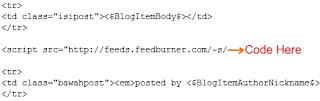
Now Sign in to your Blogger account. At your DashBoard click Template. Now your template html code window will open. In your template code, scroll to <p class=“post-footer”>. Just paste the copied html code just above <p class=“post-footer”>.

If you donot see this <p class=“post-footer”>code, Do not panic. Just Paste the code near the post metadata (author, date, comments, etc) as shown below.


Now Click Save Template Changes. Be patient up to one or two hours. Now sign in to your FeedBurner account. Go to FeedBurner Stats PRO service. Now this service will display your blogger site's visitors, page views, site traffic etc.


Friday, July 13, 2007

PeaZip


PeaZip is an open source portable file archiver. You can compress, extract, and split a file with Peazip. It supports Windows all versions and Linux.

PeaZip supports its native PEA archive format. Also PeaZip supports many archive formats like 7Z, 7Z-sfx, BZip2, GZip/TGZ, PAQ8F, PAQ8JD, PAQ8L, PEA, QUAD, split (.001), TAR, ZIP. PeaZip reads many archive formats like ACE, ARJ, CAB, CHM, CPIO, ISO, Java archives (JAR, EAR, WAR), Linux installers (DEB, PET/PUP, RPM, SLP), LHA, LZH, Open Office file types, PAK/PK3/PK4, RAR, Windows installers (NSIS, some MSI), Z/TZ.

Compression
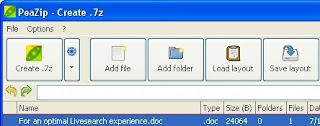
Just right click the file you want to archive. Then select Add to separate archive. Then PeaZip program window will open.


Now click customize orchive options button(small down triangle). Then select your archive format type, Compression level. Now click Create archive button. Now choose the save directory, file name then click Save button.

Extraction
Right click the archive file you want to extract. Then select Extract archives here.

Split
Right click the file you want to split. Then select Split file. Now type the split volume size in Megabytes then click O.K.

Download PeaZip