Windows Vista SP1 RC Refresh is pre-release software and it will undergo changes before the final release. Windows Vista SP1 RC Refresh is provided for testing purposes only. It is for individuals, organizations, and technical enthusiasts who are comfortable evaluating pre-release software.
Windows Vista SP1 RC Refresh is time-limited software and will no longer operate after June 30, 2008 and it should be uninstalled prior to that date. You must uninstall any previous versions of Windows Vista SP1 before installing Windows Vista SP1 RC Refresh.
You can download Windows Vista Service Pack 1 RC Refresh from here.
Tuesday, January 15, 2008
Windows Vista Service Pack 1 RC Refresh


Friday, January 11, 2008
Xinorbis - a powerful hard disk analyzer
You can analyse a drive or a directory in your computer with Xinorbis. It is a powerful disk analyzer tool. it gives the user a complete overview of the contents of a hard disk or a directory by Using a sophisticated mix of graphs, tables and tree displays.
Xinorbis is very easy to use. Just start the program.

As shown in the figure we have two options Analyse Directory and Analyse Drive. If you select Analyse Directory and choose a directory from your computer and click Scan button, then it analyses the directory and displays the results in a Pie or bar diagram and in a Text report and in tables as shown above in the figure. If you select Analyse Drive and choose a drive from your computer and click Scan button, then it analyses the disk and displays the results as explained above.
Features:
Analyse a single drive/directory or merge several together in one report
Complex report generation, with export to HTML, ASCII or XML
Save reports and compare them to see how the contents has changed
All information displays are completely resizable for ease of viewing
XP style support
Improved speed
Shell support, scan a directory through explorer
Supports Windows 98/ME/2000/XP/Vista
Download Xinorbis from here
Tool to calculate the angles necessary for installing satellite dishes
Satellite Antenna Alignment is the program used to calculate the angles necessary for installing satellite dishes. It calculates azimuth and elevation positions for all satellites at once. You will get a clear picture about what satellites can be visible from the location where the dish will be installed. This program calculates theoretical value only, but factors like obstacles (buildings, trees), the landscape, the altitude, transponder orientation, polarization, etc should also be taken into account.
This program is also very easy to use. Just start the program. On the right hand side of the window, you will observe Site location boxes. In those boxes enter the geographical coordinates of the location of the satellite dish. Then you will observe the calculation for all satellites at once in the table to the left.
Download Satellite Antenna Alignment program from here.
Tuesday, January 08, 2008
Enjoy your favorite pictures in 3D environment
With My Pictures 3D product line you can place your digital photos into a picturesque environment of realistic 3D galleries. My Pictures 3D package consists of two products, My Pictures 3D Screensaver and My Pictures 3D Album. It is a freeware software.
With My Pictures 3D Album, you can hang your favorite pictures on the walls of a modern Showroom, a secluded Yard or a bohemian-style Art Gallery. It is very easy to hang your favorite pictures.
If you want to add Aish pictures to My Pictures 3D Album, then do as explained below.
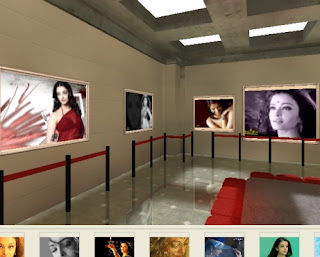
Just start My Pictures 3D Album. Then choose Create new gallery then click O.K. Then it display list of galleries. Now select a gallery then click O.K. Now that selected gallery will be opened on the right hand side of the My Pictures 3D Album window. That gallery may be a modern Showroom or an Art gallery or a secluded Yard. Put the Aish pictures folder on desktop. Now select Aish folder on the left hand side of My Pictures 3D Album. Now on the toolbar select Add Image. Then all Aish pictures will be added to the 3D gallery.
If you want see those 3D pictures, put the mouse pointer on the gallery window and move the mouse pointer while holding left mouse button. While doing like this you will move inside all the rooms of the gallery. You will find Aish Pictures in one of the rooms as shown below.
How to retrieve product key of your Windows version?
The Magical Jelly Bean Keyfinder is a freeware utility that reads the registry and extracts the key that was used to install Windows. It retrieves product key of Windows 95, 98, ME, 2000, XP, Server 2003, Windows Vista, Office XP, Office 2003, and Office 2007.
You can save the key to a text file, you can print the key or you can save the key to clipboard.
Download Magical Jelly Bean Keyfinder
Subscribe to:
Posts (Atom)