Xdn Tweaker is a free tweaking program for Windows XP, Windows Server 2003, and Windows Vista. It supports Both 32 bit and 64 bit versions.
Xdn Tweaker is a little program which makes some simple changes to Windows. Windows XP, Windows Server 2003 needs Microsoft .Net Framework 2.0 for Xdn Tweaker to work.
Features:
Changes the number of Folder views Windows saves
Resets the folder views Windows has saved
Add/Remove classic Windows 2000 user control panel icon
Disable/Enable ATI Catalyst Control Center right click on Desktop (only for use if you have an ATI video card and have the Catalyst Control Center installed)
Disable/Enable SendTo right-click menu
Disable/Enable ZipFolders
Disable/Enable the Outlook Express / Windows Mail splash screen
Put the File menu above the Back/Forward buttons in IE7
Remove/Replace the Search box in IE7
Disable/Enable Windows Media Player Explorer context menus
Disable/Enable the Documents item on the Classic Start Menu
Disable/Enable the Shortcut text added to shortcut names
Remove custom file associations from the current user's list of extensions.
Add/Remove the Copy To and Move To right-click extensions.
Download Xdn Tweaker
Wednesday, August 22, 2007
Free tweaking program for Windows


Mafia 2 announced by 2K GAMES

2K Games announced that it will publish Mafia 2, a sequel to the popular Mafia title. The game is being developed by Illusion Softworks, developers of the original Mafia title, for next generation consoles and Games for Windows. Original Mafia title brings the 1930's underworld to life. Mafia 2 brings the underworld of late 1940's-early 1950's to life.
Use your Scanner and Printer as a PhotoCopier with iCopy 1.21
Bugs regarding Scanner connection are fixed in latest iCopy 1.21 version. iCopy close on startup bug is also fixed.
What you can do with iCopy?
If you have a Scanner and a Printer then you can use both of them as a PhotoCopier with iCopy and you can get the copies by just pressing a button. iCopy is a free software and no installation is required. It is compatible with all TWAIN scanners and all printers.

With iCopy you can select Scanner mode and you can manage Image settings like brightness and contrast. You can manage print quality and also you can enter the number of copies you want. It is very easy to use. Just put the document in the scanner. Put white papers in Printer tray. Now specify the number of copies you want. Then click the Blue button.
iCopy supports Microsoft Windows XP SP1-SP2, Microsoft Windows Vista, and Microsoft Windows Server 2003. You must install Microsoft .Net Framework 2.0 or higher in your system for iCopy to work.
Download iCopy
Tuesday, August 21, 2007
Open Source DVD to MPEG-4 converter
HandBrake is an open-source, multiplatform, multithreaded DVD to MPEG-4 converter, available for MacOS X, Linux and Windows.
Handbrake is designed to work on Windows 2000 SP4 or Windows XP SP1 only. Microsoft .Net Framework 2 and Microsoft Windows Installer 3.01 are required for HandBrake to work in Windows.
Supported sources:
VIDEO_TS folder, DVD image or real DVD (encrypted or unencrypted, but protection methods other than CSS are not supported and must be handled externally with third party software), and some .VOB and .TS files
PAL or NTSC
AC-3, DTS, LPCM or MPEG audio tracks
Outputs:
File format: MP4, MKV, AVI or OGM
Video: MPEG-4 or H.264
Audio: AAC, MP3, Vorbis or AC-3 pass-through (supports encoding of several audio tracks)
Download HandBrake
Monday, August 20, 2007
How to cut mp3 files with mp3DirectCut
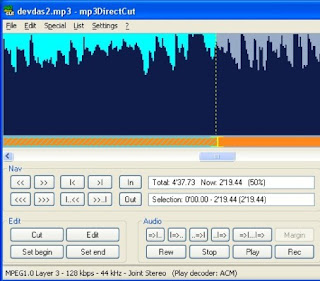
First you have to decide the part of the mp3 file you want to cut. This you can decide easily as explained below.
Run mp3DirectCut. First open the mp3 file by mp3DirectCut. Then by clicking Play button, play the mp3 file you want to cut with mp3DirectCut. mp3DirectCut gives you a visualisation of the mp3 audio data of the mp3 file being played. Mp3DirectCut will also display the percentage of the mp3 file being played. You can observe this in Total box. Observe the percentage details while mp3DirectCut is playing the mp3 file. Suppose you liked the mp3 file between 10% to 50%.
Now you can cut the mp3 file between 10 to 50% as explained below.
Just open the mp3 file by mp3DirectCut. You will observe Scrollbar just below the visual display of the mp3 audio data. You can move along a file with the slider. So move the slider until you get 10% on the Total box. Now click Set begin. Now move the slider until you get 50% on the Total box. Now click Set end. Now go to File menu then select Save selection. Now choose a save in directory and type a name for the file, then click save button. Now your file will be saved in the directory you have chosen. So it is very simple to cut a mp3 file.
mp3DirectCut is a frame based editor for MPEG audio (Layers 2 and 3). You can cut, copy, paste or change the volume without re-encoding anything of the file. This makes mp3DirectCut very fast and prevents loss of audio quality. you can also directly record and encode an mp3 from your audio input device.
mp3DirectCut supports all 32 bit windows versions. mp3DirectCut plays mp3 files with MP3 ACM Codec. Windows XP and Windows Vista contains this codec by default.
Download mp3DirectCut