Monday, April 30, 2007

Riva FLV Encoder(freeware)


We can transcode AVI, MPEG, Quicktime, WMV format video files to the advanced Flash Video (FLV) format with this free Riva FLV Encoder. Riva FLV Encoder comes with the free Riva FLV Player. So we can view the transcoded FLV files with Riva FLV Player.

Also we can transcode FLV to avi, mpeg, wmv formats with the help of Riva FLV Encoder.

We can extract the images form video files, cut the videos with a startoffset and a encode duration.

First I will explain how to transcode video files to FLV format files. Start the Riva FLV Encoder program. You will observe the Riva FLV Encoder options as shown below.
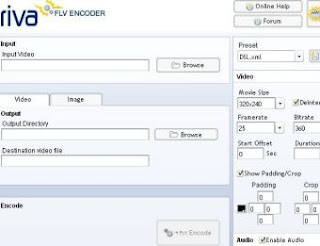


Suppose you have avi file named Tom and Jerry. Now browse the path of this file. Then at Output Directory browse the path where you want to save the FLV file(I have selected desktop). You can set the movie size also. Movie size option is at right hand side. Then click the Encode button. Then the transcoded file is saved at the specified directory as shown below.


Now let us transcode flv file named Tom and Jerry1 to wmv file. Procedure is same as above. But You have to change the extension of Destination Video File to wmv as shown below.


But when you play the file, it will give a message DIV3 codec is required to play this file. So download the above codec from the following site.

http://www.free-codecs.com/DivX_Free_download.htm

After installing the DivX Free 5.2.1 codec, we can play the above wmv file.

Onemore important thing. Suppose you transcoded flv file to avi file as explained above. But when try to play the file only audio comes but no video. You have to install the FFDShow MPEG-4 Video Decoder to rectify it.

http://www.free-codecs.com/FFDShow_download.htm

With Riva FLV Encoder we can also do Image Extraction, we can cut the video file with a startoffset and a encode duration. I will explain both of them now.

Image Extraction:
Observe the above figures. There are two options Video, Image in all the three figures. Just click Image option. Now browse the path of the video from which you want to extract images. Now browse the path where you want to save the images(You can extract first image or All Images. Also you can set the resolution.). Now click Encode button. Your Image will be saved in the directory you specified.

Cutting the Video file:
If you are playing a video file. Then the player will display the time in the lower right corner of player window. We can use this time duration intervals for cutting the video clip.

Browse the file you want to cut in Input Video box. At Output Directory browse the directory where you want to save the video. Also type the extention(avi or mpeg or wmv) of the Destination Video file as you like. Specify movie size. Now specify Start Offset and Duration in seconds as shown below. You can specify your own time intervals.


Now click Encode button. Then the video file will be saved in the directory specified by you.

Download Free Riva FLV Encoder

Free Riva FLV Player comes with Riva FLV Encoder. You can download Riva FLV Player separately from the link below.

Download Free Riva FLV Player


Thursday, April 26, 2007

Paint.Net


Paint.NET is an image editing and photo manipulation software. This is a Freeware program. Paint.Net is a powerful image editing software than MS Paint. In MS Paint we can not resize an image, we can not crop a selection, we can not apply special effects like emboss, blur, clouds etc, we can not have clone stamp tool etc. Paint.Net have all these features. At the same time we can not compare this with photoshop. So we can use this software instead of MS Paint, Irfan View etc. For advanced image editing techniques you have to use Photoshop only.

Paint.Net supports layers, unlimited undo, special effects, useful and powerful tools than MS Paint. This software's layers technique is O.K. But we can not compare this with advanced layer techniques of photoshop.

When compared to MS Paint, Paint.Net includes Gradient tool, Magic wand tool, Clone stamp tool, Text editor tool and a Recolor tool. Also many special effects are included in Paint.Net. We can use this software instead of MS Paint.

Paint.Net supports Windows XP, Windows Vista, Windows server 2003. For this software to work you must install .Net Framework 2.0 or .Net Framework 3.0

Download Paint.Net


Sunday, April 22, 2007

VidSplitter 1.2(Freeware)


VidSplitter is a complete Video splitting tool. It splits large AVI, MPEG, WMV, ASF files into smaller video clips. This program is very easy to use. No technical experience is needed.

This is a freeware program. It splits the files with high speed and with good quality.

Download VidSplitter

Important Note:
For this program to work you must install FFDShow MPEG-4 Video Decoder. This video codec is must and should.

Download FFDShow MPEG-4 Video Decoder

Saturday, April 21, 2007

Links to other useful sites

Link to us by using the following Information.

URL: http://technodata.blogspot.com
Title: The Technology Info
Description: A Technology Oriented Blog covering Installation and Configuration of all Windows O.S including Servers, Linux, Software downloads, Html, Gaming News, Tips and latest Tech news

Windows, Linux and Mac news

Custom web design services, website designs, graphic/logo designs
CCDantas Web Design offers custom website design services. We build affordable custom web designs, executed by certified professionals, that involves creativity and fascinate the imagination!

Computer Help directly over the Internet
At Ye Olde Computer Shoppe we are dedicated to providing you with high quality technical support solutions. We provide personalized, convenient & affordable training & online computer support nationwide via Screen Sharing Technology. We can fix most problems Online directly over the Internet and we can do it right now.

Computer Help - Providing Windows XP home users with security, optimization and technology tips.

Free Software Download At Softdll.com
Large archive of freeware, shareware, and trial software for windows.

Data Recovery

Computer Directory

Software Directory

Littlbuger.info Downloads
Best one stop shop for popular freeware downloads and other great freeware and shareware. I try to help the community with as much speed and quality as i can while keeping everything free.

CaribooPlanet - Software Download Site - Download freeware, shareware and demoware application for Windows, Macintosh, Palm OS, and Linux. Utilities, Drivers, MP3, Multimedia, Internet, HTML, Games...

Ricky's web templates
- Free and premium professional web templates and graphic. We also offer quality web design and hosting services.

Robs Computer Corner
Computer service, repairs, information, and a full range of services for all of your computer needs.

OnToplist.com ranking: Best blogs on Technology and Science

OpenSuite Customer Relationships - OpenSuite™ Customer Relationships is an integrated suite of open source CRM components combined with best practice open source CRM consulting and technology services to extend open source CRM functionality and enhance security for the enterprise.

DIY Computers - How to Build a PC - Learn how to build your own computer in no time. Computer terminology explained. DIY Computer will save you money. Computer secrets shared!

URLScan Security tool for microsoft Internet Information Service (IIS)
How to configure UrlScan security tool to restricts the types of HTTP requests that Microsoft Internet Informatin Service (IIS) will process. the

Hardware & Software Search Engine - CompuDataSearch.com - The search engine for computer hardware & software industry.

Data Recovery Serivces by CBL
CBL Data Recovery is London's leading provider of data recovery services for failed hard disk drives in laptops, desktops, data servers, RAID arrays and tape cartridges.

Wednesday, April 18, 2007

Unable to see downloaded YouTube videos(only hear sound and no video), you can get solution here


All we know that we can download online videos from YouTube and other similar sites. Generally we can download those videos to our computer in FLV format. Flvplayer is needed to play FLV files. FlvPlayers will play those files smoothly without any problems.

There are applications that will download videos from YouTube and save them as Avi or Mpeg files to your computer. We can use windows media player to play avi, mpeg files. But media player will play mpeg files smoothly. But we can not play avi files smoothly. When we try to play the downloaded avi file, we here audio only and can not see the video. The reason is missing of vedio codec software in our computer. We can rectify the problem using FFDShow MPEG-4 Video Decoder. It is freeware. Just install this codec, then you will see the video also.

FFDSHOW is a DirectShow decoding filter for decompressing DivX, XviD, H.264, FLV1, WMV, MPEG-1 and MPEG-2, MPEG-4 movies. It uses libavcodec from ffmpeg project for video decompression, postprocessing code from mplayer to enhance visual quality of low bitrate movies, and is based on original DirectShow filter from XviD, which is GPL'ed educational implementation of MPEG4 encoder. You can download it from the following site.

http://www.free-codecs.com/FFDShow_download.htm

Now let us know the different ways to download videos from YouTube and other similar sites.

1. YouTube Downloader is a free application that will download videos from YouTube and save them as Avi or Mpeg files to your computer. It is very easy to use. Install the program. Then Simply paste the URL of a YouTube video into the program, now click Start, then the AVI or MPEG file will be downloaded into the folder specified by you in Save To box. Just play it with windows media player classic. If you save the video as Avi, then you have to install FFDShow MPEG-4 Video Decoder as explained above for getting the video.

http://downloadcenter24.com/video-and-dvd/youtube-downloader.html

2. Video DL is a application that allows you to download online video into your computer. It supports YouTube, Google Video, and Break.com videos. Simply copy the link of the page with video and paste it into the textbox. Now click Get It and follow the instruction. After you have saved the files into your harddrive, rename the file with .flv extension so that FLV Player will recognize it. You need FLV Player to play it.

http://www.videodl.org/

3. You can download online videos from any site into your computer from the following site. Copy the link of the page with the video on it and paste it in the box provided. Then click download. You need FLV Player to play it.

http://keepvid.com/

4. You can download online videos from the following site. Copy the link of the page with the video on it and paste it in the box provided. Then click Get It. You need FLV Player to play it.

http://www.kissyoutube.com/

5. Desktop YouTube is a freeware software that allows you to download videos from YouTube.com right from your desktop. paste the YouTube URL and this software will download the video for you. The downloaded video can be played using any FLV player. Also .NET Framework 2.0 is required for this software to work.

http://www.abhisoft.net/downloads.htm

6. Fidyo is both a FLV record program and a FLV player. You can download FLV files with this program and you can watch it also. Before installing FIDYO, first you have to install microsoft.net framework 2.0.

At present you can download and watch FLV files from youtube.com, video.google.com, metacafe.com, break.com, dailymotion.com and vids.myspace.com

http://www.fidyo.com/download.aspx?dil=en-US