Sunday, December 31, 2006

Text To Speech Software


Read Please software will read any text from your Browser, Email, Word processor, Spreadsheet or any program which displays text.
This Website offers two versions Read Please 2003, Read Please Plus 2003. Read Please 2003 is free where as Read Please Plus 2003 is 30 days trial version. We can download both as a single file. Microsoft text to speech engine software also bundled with them in the same file.
Both works in the same manner. Second one has extra features. We have to copy the text to the clipboard by COPY command. Then Paste it into the Read Please window by PASTE command. Then press PLAY button of Read Please Software. That’s all.
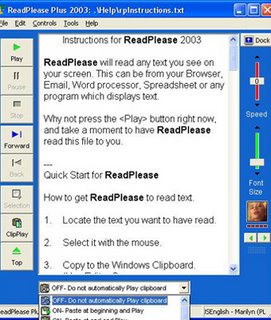
Read Please Plus 2003 has extra options like CLIPPLAY,TOP etc. By clicking CLIPPLAY button Read Please Plus will read any text that is copied to the CLIPBOARD. By clicking TOP button Read Play Plus 2003 will read the text from the beginning.
Download Read Please

Monday, December 18, 2006

How can you delete your un used Yahoo ID permanently?


Any one can simply delete their unused Yahoo ID's. Yahoo provides this facility. After you deactivated your account then You no longer have access to your account. But Yahoo will take 90 days to delete any account from their user database in order to discourage users from engaging in fraudulent activity.

What you will lose after terminating your account?
Naturally you will lose your Yahoo ID,Yahoo Mail Address and Profile Names. Your account data and settings across the yahoo network will be removed also. This includes the contents of your HotJobs, Yahoo Mail, Yahoo Address Book, Yahoo Small Business, Yahoo GeoCities, Yahoo Briefcase, My Yahoo etc. Any paid services that you own with this yahoo ID will also be terminated by account deletion. You may not be able to recover payments remitted for these services and the data associated with these accounts.

IMP Note: Once you delete your Yahoo account then you will not be able to reactivate it. You have to sign up for a new account only.

To delete your Yahoo Account JUST CLICK Here.

What about deletion of unused Rediffmail Account?
There is only one way to deactivate your Rediffmail Account. Simply Do not use that Account for a continuous period of 90 days. Then that account will be automatically deactivated.


Saturday, December 16, 2006

How can you open programs with Numeric Keypad?


Most of us are not using the Numeric Keypad at all. Only PC Gamers are utilizing the Numeric Keypad while playing games. Numeric Keypad Keys are used as Game Control Keys in only a few games,mostly multiplayer games. Almost all remaining games won't use numeric Keypad Keys.

Any one can use Numeric Keypad for opening the programs on the desktop,programs in the programs list. Suppose MS Word is in the programs list. We can open it with Numeric Keypad like this.

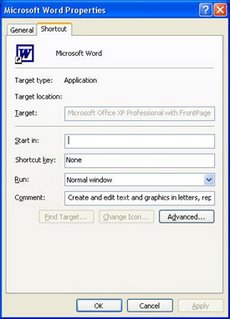
First ON the NUM LOCK. Click on start button. Click on All Programs. Then go to MS Word program(Don't click it,it will open) then right click MS Word program and choose Properties option. Now a dialogbox will present on the screen like this.


In the FIG you will observe None in the Short Cut Key box. Just click the mouse at None then press a key on the Numeric Keypad(Suppose Num 4). Now click APPLY then click O.K.

Now you can open MS Word program from the Numeric Keypad at any time by pressing 4 on the Numeric Keypad. Remember that you have to ON the NUM LOCK before pressing Number 4.

Same procedure is applied for opening Short cut programs on the desktop with Numeric Keypad. You have to right click a Short Cut Program then choose properties option. Then follow the same procedure above.


How can you know your Internet Connection Speed?


You can easily know your Internet connection Speed by any of the following Sites.

1. Just CLICK HERE then a website will open. Then just click Speed Meter tab that is at the top of the page. Then it will display your connection speed like this.

2. Just CLICK HERE then a website will open. In that site you will observe a link How Fast is Your ISP. Just click that link. It will display your connection Speed like this.


Are you facing 'PRESS F1 TO CONTINUE' while you start your computer everytime?


Here is the solution to rectify it.

On some computers you will observe the following message when you ON those computers.

CMOS Checksum Error - Defaults Loaded
Press F1 To Continue, DEL To Enter Setup


The above message comes due to three reasons.
1. Due to faulty CMOS Settings.

2. When a new Hardware Component is installed in system then there may be settings for this new Hardware in CMOS. In this case also we face Press F1 To Continue.

We will also face this message when an existing Hardware component is removed from the computer.

The solution for the above two cases is just set the CMOS Settings to Default. Then save those settings and restart the computer. Your problem will be solved.

Still you are facing the same problem then the last reason is this one.

3. CMOS battery is Weak or Fail.

Just replace the battery with new one. Then you won't get message Press F1 To Continue now.

In Win XP Systems when battery is weak you will face BOOT DISK FAILURE problem also. You have to replace the old battery with new one only.