Tuesday, September 11, 2007

How to delay Startup applications when windows is loading?


When Windows loads it's Startup file, it attempts to load every application in there at the same time. If you have so many applications in the Startup file, Then each application will try and grab the CPU, RAM and HDD at the same time. Also each application tries to load at the same time. This in turn slows down your entire Startup Process.

Startup Delayer is a small program which allows you to setup how many seconds after Windows has started, to load each application. Suppose you have Yahoo Messenger program that startup when Windows starts. Then you can easily set this program to start some time after Windows startup with the help of Startup Delayer program.

How Startup Delayer program works?
Just run the program. It displays list of startup programs as shown below.
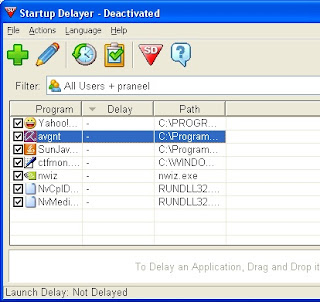


Now if you want to set a delay time for Yahoo messenger, then just double click on Yahoo. Then it will display edit window for Yahoo as shown below.
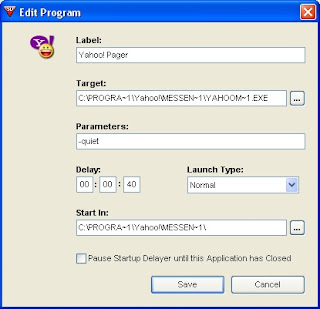

Now set the delay time as 40 seconds (for example) then click Save button. Now go to Actions menu of Startup Delayer then Activate Startup Delayer by selecting Use the Graphical Version. From this point Yahoo Messenger will start 40 seconds after Windows startup.

Download Startup Delayer

Note: When you run Startup Delayer, some machines complain about runtime files. You can download those files from here.


Sunday, September 09, 2007

Digital Certificate & IKEY USB Token installation guide for Andhra Pradesh Contractors


This guide will help the Contractors of Andhra Pradesh in installing their USB Token and Digital Certificate. They can easily follow the instructions given by me.

IKEY USB Token Installation:
Insert the CD containing the iKey software in the CD Drive. Double-click IKEYALL.EXE to start the installation process. Follow the on screen instructions. The installation process prompts you to enter the ikey. Then insert the iKey token in the USB port of the machine and complete the installation.

Enabling AP eprocurement site as a Trusted site:
You have to enable eprocurement site as a Trusted site. For this open Internet Explorer 6.0( Minimum IE 5.5 version). Go to Tools menu then select Internet Options. Now click Security tab. Then click Trusted Sites. Now click Sites. Now Add the site https://tender.eprocurement.gov.in to the list of trusted sites and then click Add button. Then click O.K and click O.K. Now you enabled eprocurement site as a trusted website.

Enabling the ActiveX Controls:
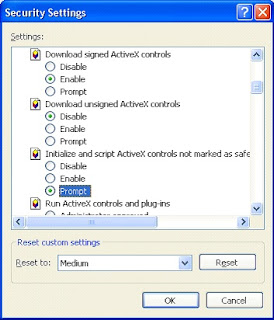
Now you have to enable the following ActiveX Controls. For this open Internet Explorer 6.0( Minimum IE 5.5 version). Go to Tools menu then select Internet Options. Now click Security tab. Then click Custom Level button.


Now keep the Security Settings to Medium.
Enable Download Signed ActiveX Controls option.
Enable Run ActiveX Controls and Plugins option.
Enable Script ActiveX Controls marked safe for scripting option.
Make Script ActiveX Controls not marked safe for scripting option as Prompt

Then click O.K and again click O.K.

Installing the Certificate Trust Chain:
Now you have to download Certificate Chain and install it. You can download the certificate from the site https://tender.eprocurement.gov.in/DigitalCertificate
/index.htm
Go to this site then click the link GoAP/APTS Trust Chain. Then click Download Certificate Chain. After you downloaded the 3.16 kb file then install it. Just right click on the file then choose Install Certificate and install it.

This completes all necessary things. Now contractors can do their work easily. Just go to https://tender.eprocurement.gov.in then enter your username and password. You have to enter these details in Secure Mode only. Then contractors can do their online work regarding tenders very easily.

Note: During your work you must keep your iKey token in the USB port of the machine.


Thursday, September 06, 2007

Intel launched industry's first quad-core processors


Intel launched quad-core Xeon 7300 series processors specifically designed for multi-processor (MP) servers. These new Quad-Core Xeon 7300 series processors can deliver more than twice the performance and more than three times the performance per watt over the company's previous generation dual-core products.

These 7300 series includes frequencies up to 2.93GHz at 130 watts, several 80 watt processors and a 50 watt version optimized for four socket blades and high-density rack form factors with a frequency of 1.86GHz. The Intel 7300 chipset with Data Traffic Optimizations provides a balanced platform design with several new technologies that enhance data movement between the processors, memory and I/O connections.

Wednesday, September 05, 2007

Free HardDisk Utility


HD Tune is a free Hard Disk Utility

HD Tune measures the performance of your harddisk

HD Tune shows detailed information about your harddisk supported features, harddisk capacity, partition sizes details, harddisk serial number, firmware version etc

HD Tune checks the health status of your harddisk

HD Tune displays the temperature of your harddisk

HD Tune scans the surface of your harddisk for errors

This is a very useful utility. HD Tune supports Windows 2000, Windows XP, Windows XP 64-bit, Windows 2003 Server.

Download HD Tune


Tuesday, September 04, 2007

How to know whether an update is available for your installed application?

With a small application AppGet, you can get a list of installed applications in your computer. When an update is available for one of the applications, then it will be shown in AppGet. Then you can update that application very easily.

When you run AppGet then it will create a list of all your installed applications and their corresponding version numbers. Then AppGet will submit this data to the online AppGet database.

After this information has been processed, you will automatically be notified of updates of your installed applications. For some applications It will show the download link also. For some applications it will show the Google search link. With this google search link you can easily go to that application's website then download it easily.


Download AppGet