Saturday, November 18, 2006

Design Your Own Website using HTML


In this article I will tell you a simple webpage design using HTML and how to host it on www.freewebs.com. This article is for newbies only.

HTML documents use TAGS. A tag is a string in the language surrounded by a less than (<) and a greater (>) than sign. An opening tag is a string that does not begin with a slash (/). An ending tag is a string that begins with a slash (/). The region between an opening tag and a closing tag with the same string is referred to as an element.

An opening<html> and a closing </html> tag should surround the entire html document. We should also find opening and closing tags for <head> and <body> elements. An HTML document code should appear as shown below.

<HTML>
<HEAD>
.....
</HEAD>
<BODY>
.....
</BODY>
</HTML>

I will tell you some other simple tags.

The title of the HTML document is placed between the opening<TITLE> and closing </TITLE> tags. <TITLE> tags are placed within the <HEAD> tags.

<HR> tag places a horizontal Rule. This tag is within the <BODY> tags.

<BR> tag represents a line break

<P> tag represents a paragraph break.

<H1> ..... </H1> tags represents a level 1 heading.

<H2> ..... </H2> tags represents a level 2 heading.

<CENTER> ..... </CENTER> tags aligns the text between them centrally.

BGCOLOR this attribute is used in the opening <BODY> tag for setting the background color of Webpage.

If you want to give a link to yahoomail from your site, you can do that with the help of <A> tags like this.

<A HREF=http://www.yahoomail.com>yahoomail</A> Result : Thease tags underline yahoomail. So if you click yahoomail then it will take you to www.yahoomail.com

Now Design A simple Webpage:

Open Notepad. Type the following html code in Notepad and save it with a file name with an .html extension.(EX: save as index.html)

<html>
<head>
<title>Homepage of Praneel</title>
</head>
<body bgcolor=orange>
<h1><center>MY HOMEPAGE</center></h1>
<hr>
<h1>Praneel</h1>
D/No: 1-11 <br>
M.G. Road <br>
Vijayawada<br>
<hr>
<h1>About Me</h1>
I am studying 10th class in Adithya Public School,Vijayawada.
<p>
My present Aim is to get state rank.
<hr>
<h1>My links</h1>
<a href=http://www.yahoomail.com>yahoomail</a>
<hr>
</body>
</html>

Now save this as index.html then open the file in internet explorer. Now your Webpage will be like this.


Now I will tell you how to host this on www.freewebs.com site. Hosting is free.

Open www.freewebs.com. Then sign up for a free account. Choose a username and password and give email address and other details. Tick their terms and conditions. Click Next Step. Then click I AGREE.Then choose HTML mode then type your full name and choose site category then click nextstep. Now it will ask some details. It is optional so donot give any details. At top right corner you will find “Nothanks continue” link. Click that link. Then Welcome to freewebs link come.


Now click site manager. Here you will find upload a file. So you can upload your notepad file. Remember onething. You have to name your file as index.html in order to upload to freewebs site.


One thing is important. Freewebs site will send a verification link to your email address which you have given during filling the details for freewebs account. So open your email box and click the verification link sent by the freewebs site.

Now click upload a file. In the box give the path of your's index.html file by clicking the browse button. Now click upload file button. Then your index.html file will be uploaded to freewebs site. I have given user name as praneel. So my website name is like this.
http://www.freewebs.com/praneel Now you can check this site on net.

You can edit your index.html file at anytime and you can save it. For this open www.freewebs.com site. Then give your username and password and goto your account. There click Site manager button. Then you can observe your index.html file with EDIT,RENAME,DEL buttons. Click edit buttion then your html code will be open in another window. Do the necessary changes then go to file menu of WebEdit 1.9(Not internet explorer file menu) and click save. Then your index.html will be saved.

Without knowing HTML, You can also create your website at freewebs.com. For this do like this.

Open www.freewebs.com. Then sign up for a free account. Choose a username and password and give email address and other details. Tick their terms and conditions. Click Next Step. Then click I AGREE.Then Do not choose HTML mode. Here you have to choose one of the templates of Freewebs.com site. Rest of the procedure is almost same as above
.


How can you create HTML links?


1. Create a link to a site

Suppose we have text like below.

“If you want to download yahoo messenger please click here”.

Suppose you want to make the word “click” link to http://messenger.yahoo.com Then do like this.

Place <A> tag before CLICK and </A> tag after CLICK like this in the above sentence.

If you want to download yahoo messenger please <A>click</A> here.

Next in the <A> tag place the HREF attribute like this.

If you want to download yahoo messenger please
<A HREF=“http://messenger.yahoo.com” >click</A> here.

So we have create a link to yahoo messenger site.

2. Create a link to a page located in your computer.

If suppose you have “sai.html” document located in your computer.If you want to create a link to it then do like this

<A HREF=“sai.html” >sai</A>

3. Create a link to your e-mail address.

If suppose your e-mail address is sai122@yahoo.com then you will create a link to your e-mail address like this.
<A HREF=“mailto:sai122@yahoo.com” >e-mail me</A>


HTML Table Tags


1. <TABLE> ..... </TABLE>
These html tags specify data between them as a table. For kepting data in table you can use data cells.

2. <TABLE BORDER> ..... </TABLE>
Html does not display borders around the cells of the table. If you use BORDER attribute then html display borders using the lines.

3. <TABLE WIDTH=576> ..... </TABLE>
With the help of WIDTH attribute we can set the width of the table.

4. <TABLE ALIGN=CENTER> ..... </TABLE>
With these html tags table is created centrally on the screen.

5. <TABLE>
<CAPTION>caption of the table</CAPTION>
< ! - - table data - ->
</TABLE>
In between caption tags we can put a caption to the table.

6. <TABLE>
<CAPTION>caption of the table</CAPTION>
<TH>name 1<TH>name 2<TH>name 3
< ! - - table data - ->
</TABLE>
With <TH> tag we can put heading to cells. The text after <TH> tag is heading of a cell. In the above table there are three columns. So with the help of <TH> tags I put headings to three columns as above. Inside <TD> tag we can use ALIGN attributes left,center,right,justify for aligning the text.

7. <TR>
This tag creates new row of data.

8. <TABLE>
<CAPTION>caption of table</CAPTION>
<TH>name 1<TH>name 2<TH>name3
<TR><TD>some data<TD>some data<TD>some data
</TABLE>
There are three data cells in the above code. We can put data to the table after <TD> tag.

9. <TD></TD>
Since there is no data between <TD>tags this will become a blank data cell.

10. <TABLE>
<TR ALIGN=CENTER><TD>some data<TD>some data<TD>some data
</TABLE>
Since Align attribute center is in <TR> tag,the data in all data cells aligns centrally in data cells.

11. <TABLE>
<TR ALIGN=CENTER><TD>some data<TD ALIGN=LEFT>some data<TD>some data
</TABLE>
Here the data in second cell aligns left where as the data in first and third data cells aligns centrally in datacells.

12. <TABLE>
<TR VALIGN=TOP><TD>some data<TD>some data<TD>some data
</TABLE>
By VALIGN attribute we can do vertical alignment. In above table data is aligned to top of the data cells in the entire row.

13. <TABLE CELLSPACING=8> ..... </TABLE>
By using above attribute we can control the space between cells in a table.

14. <TABLE CELLPADDING=6> ..... </TABLE>
By using the above attribute we can set the distance from the cell edge to the cell data.


Tags For Formating The Body Text


1. <I> ..... </I>
These html tags italicize the text between them.

2. <B> ..... </B>
These html tags bold the text between them.

3. <FONT SIZE=7> ..... </FONT>
These html tags make the font size of the text between them to 7.
Size can be specified by any integer between 1 and 7.

4. <FONT COLOR=#FF0000> ..... </FONT>
These html tags make the font color of the text between them to red.

5. <FONT FACE= “ARIAL” > ..... </FONT>
These html tags make the font of the text between them to Arial.

6. <FONT SIZE=7 COLOR=#FF0000 FACE= “ARIAL” > ..... </FONT>
These html tags make the font size of the text between them to 7,font color of the text between them to red and font of the text between them to Arial.

7. <U> ..... </U>
These html tags underline the text between them.

8. <SUB> ..... </SUB>
These html tags place any text between them below the level of the line and in a smaller font.

9. <SUP> ..... </SUP>
These html tags place any text between them above the level of the line and in a smaller font.

10. <STRIKE> ..... </STRIKE>
These html tags place any text between them in strikethrough style.

11. <H1> ..... </H1>
These html tags identify text between them as a heading. This is level 1 heading. A total of six level headings are in HTML Language. Level 6 heading tags are <H6> ..... </H6> .The largest heading is <H1>. The smallest heading is <H6>. So Html enables users to identify headings and subheadings through these tags.

12. <H1 ALIGN=LEFT> ..... </H1>
These html tags align the level 1 heading to the left of the window.

13. <H2 ALIGN=CENTER> ..... </H2>
These html tags align the level 2 heading to the center of the window.

13. <H6 ALIGN=RIGHT> ..... </H6>
These html tags align the level 6 heading to the right of the window.


Friday, November 17, 2006

Which is the Most Favourite PC Game of Indian Kids?


I am observing children who are playing PC games since 2000. At that time children of age 10 and above are interested in PC games and very few children of age below 10 are interested in PC games.

Most of them started playing Dos games like Prince,Mario etc., at the beginning. After that they started playing Roadrash,Claw,Cricket 2000,NFS 2 Special edition,Tarzan the action game,Age of empires,Midtown madness,Commandos behind enemy lines,Frogger2,GTA 2,Maxpaynee etc.

In holidays all of the children spent their time in playing above games. They spent lot of time in playing Roadrash,Claw,NFS 2,Age of empires,Maxpaynee. Many of them played NFS 2 Se in double player mode. But out of the above children some are attracted to GTA 2. They not only played the above games but also spent lot of time in playing GTA 2.

In 2002 GTA 3 released. Then all the children attracted to GTA 3. Not only GTA 2 fans but also all the children attracted to GTA 3. In holidays they spent most of their leisure time in playing GTA 3. Ofcourse they spent some time in playing other Action games,First person shooter games,Racing games,Cricket 2002 released at that time.

In 2003 GTA Vice city released. At that time kids of age between 6 to 10 are also attracted to Vice City game. In holidays they used to play Vice City game regularly. At that time the younger brothers of these kids are watching the game while their elder brothers are playing.

In 2005 GTA Sanandreas released. From 2005 all the children of age 4 and above are also playing GTA Sanandreas.

Have these children really understood the game?

Are these children playing the game missions wise?

Why these kids are attracting to GTA series Games?

For getting answers to the above questions I have observed those kids and children while they are playing.

The elder children understood the game and they are playing Missions wise. But all the children are playing the game using cheats.

What about kids & Younger children?
These guys really did not understand the game. Also they are not playing the game missions wise. These kids & younger children learnt cheats from their elder brothers then playing the game.

The kids are enjoying the game by get in a car and take a ride on the streets of Sanandreas. With the help of cheats the kids are getting different vehicles,different weapons etc., They simply use those weapons & vehicles and enjoying the game.

In Vice City kids are using the following cheats most frequently.

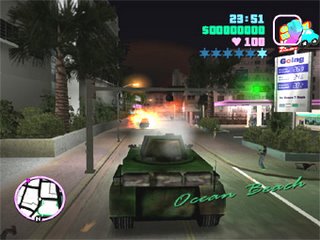
While playing the game they are typing PANZER then a tank is coming into the game. With that tanker they are going on the streets of vice city and blowing everything.

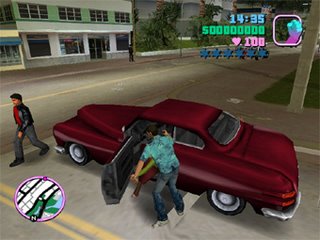
While playing the game they are typing GETTHEREAMAZINGLYFAST then they are getting the fastest car. Then they are typing another cheat COMEFLYWITHME then car is flying in the air like this.

Next they are enjoying by riding vehicles on the streets like this.


In Sanandreas kids are using the following cheats most frequently.

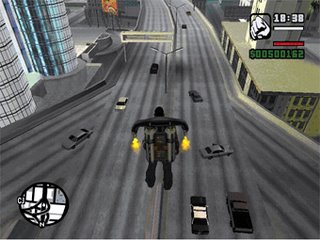
They are typing ROCKETMAN cheat then flying with jet pack like this.

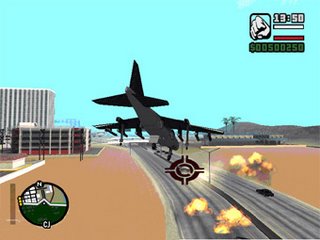
They are typing JUMPJET cheat then aeroplane is coming. With the aeroplane they are flying over the city and blasting everything on the streets.

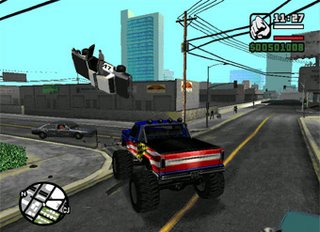
Then they are typing MONSTERMASH cheat then a small car like below comes. Then they are wondering on the streets of Sanandreas with that car.

Not only the above cheats,they are using so many cheats.

Not only kids,children but also college students are also playing these GTA series games in their leisure time. College students are also playing Cricket 2005,Action&First person shooter games,Wrestling games but they are spending most of their leisure time in playing GTA Series games.

Now All of these Kids,Children,College Students are waiting eagerly for PC versions of GTA Liberty City Stories,GTA Vice city Stories and GTA 4.